
Skyfire was never a good mobile browser. It was slow, ate lots of data, only worked in North America and Western Europe, and it sucked your battery dry real quick. But it did let you watch Flash and QuickTime movies where other browsers failed, and because of its american proxy server Skyfire allowed those outside Germany, England, and the USA to listen to last.fm without having to buy a subscription.
But not anymore. Skyfire for Symbian was pulled from Skyfire's own website and the Ovi store a while ago, and all the copies on forums and other sites stopped working. No version of Skyfire connects on my Nokias. Skyfire for Symbian is really totally dead now.
Maybe I'll meet Skyfire again on Android. Sure, Android can do Flash by itself, but bypassing the geographical restrictions of last.fm through Skyfire's proxy server is a good thing too.
Monday, 10 January 2011
Skyfire for Symbian is really dead


Friday, 26 November 2010
Web browsers: Opera Mobile fast, Skyfire dead, Bolt new
Opera Mobile

The big brother of Opera Mini is updated: version 10.1 is no longer in beta testing. Unlike Opera Mini, Opera Mobile doesn't use a proxy server so there's nothing in between you and the web. Version 10.1 scrolls smoother and runs javascript faster.
Opera Mobile has a turbo mode which makes it behave like Opera Mini. The main advantage of turbo mode is that it saves a lot of data traffic, which could make a big difference on your phone bill if you're roaming abroad and pay by the megabyte. It looks like Opera Mini in just about everything else too. Same user interface with tabbed browsing, Opera Link to synchronise your bookmarks and speed dials with other Opera browsers (like Opera Mini) on all your phones, and the same annoying "are you sure" confirmation screen when you want to close the program.
• Opera Mobile
Skyfire
Skyfire is not a good mobile browser (slow, eats lots of data, only works in North America and Western Europe), but it does let you watch Flash and QuickTime movies, and because of its american proxy server it allowed those outside Germany, England, and the USA to listen to last.fm without having to buy a subscription.
But hurry, because Skyfire is going to ditch Symbian. Skyfire's site only lets you download the iPhone and Android versions, and they announced that the proxy-based Symbian version 1.0 will stop working at the end of the year. The latest Symbian version of Skyfire is 1.5, but all the signs indicate that this version will die together with version 1.0.
• Skyfire
Skyfire for Symbian is no longer available from Skyfire's own website, and they've pulled out of the Ovi store too. You can still get Skyfire 1.5 from Mobile Castle:
• Skyfire 1.5 at Mobile Castle (you'll need to create a free account, or use BugMeNot) UPDATE: Mobile Castle is dead. And so is Symbian.
Update: Skyfire is really dead now. No version of Skyfire connects on my Nokia. They promised to kill it and they killed it.
Bolt

Now that Skyfire for Symbian is about to die, it might be a good idea to give Bolt a shot.
Symbian web browser Bolt does tabbed browsing, has a good user interface, and it does a good job at conserving page layout (except for sites with frames). Bolt plays YouTube and other Flash video, but Skyfire does it better.
There's no predictive text input, so entering URLs can be a bit unpleasant.
Bolt is made in mobile Java. The official site only gives you a .jad file, and wants you to download the corresponding .jar file from your phone for an on-the-fly install. Of course you can also open the .jad file in a text editor to look up the URL for the .jar file if you want to look inside the file before installing it on your phone.
If Bolt doesn't play sound on your phone, switch to a profile with warning tones on and try again. Yep, that sucks, but it's a disadvantage common to mobile Java programs.
• Bolt UPDATE: This link is dead. And so is Symbian.
• Bolt at GetJar UPDATE: This link is dead. And so is Symbian.
Wednesday, 3 November 2010
New UC Browser goes official

Unofficial english translations of the latest edition of chinese Symbian web browser UC Browser were already available on most mobile phone software forums, but now you can get UC Browser version 7.4 straight from the makers.
UC Browser is similar to Opera Mini. It routes sites through a proxy server to speed up surfing and reduce the data traffic consumed by your phone. Web pages can be displayed like in a desktop browser, which means lots of scrolling and zooming in and out on small phone screens. You can choose adaptive view instead. This resizes images and reflows text to fit the width of your screen, which eliminates the need for horizontal scrolling. Adaptive view in UC Browser 7.4 is much better than in older versions, especially for sites with extensive formatting and other eye candy. You can also activate page segmentation, which splits large pages into smaller ones for faster loading and easier browsing.
UC Browser has a download manager, makes it really easy to copy text and images, and deleting your browsing history and cookies requires less clicks than in other Symbian web browsers.
The "my shortcuts" screen of UC Browser looks like a mix of Opera Mini's speed dial page and a bookmarks menu. Unfortunately it is filled with links to sites chosen by the makers of UC Browser and you can't remove the clutter. Do these sites pay UC Browser to get themselves advertised this way? The shortcuts screen would be way better if it would mix speed dials with your own bookmarks folders.
• UC Browser
Thursday, 28 October 2010
Opera Mini goes Symbian and speeds up
Opera Mini is an excellent web browser for Symbian, mainly because of its tabbed browsing and its proxy server that compresses data to reduce data traffic and increase speed.
The bad news: Opera Mini was coded in Java. This made things easier for the developers, because they could make a "one size fits all" installer that works on every phone that supports mobile Java. But this made the program start and run as slow as quicksand, and spit out an endless stream of security warnings and repeated requests for permission to go online.
The good news: we no longer have to suffer the limitations of mobile Java when we use Opera Mini, because now there is a real Symbian version of the program.
The new Opera Mini for Symbian loads much faster than the old Java application. Gone are the security warnings (Do you really want your web browser to go online? Duh!). Also gone are the repeated requests to define an access point because Opera forgot your choice of five seconds ago. Too bad that it can only remember a single access point instead of an access point group, a.k.a. as "destination" in Symbianspeak. But even so, one stored access point is better than nothing.
Scrolling through websites is a lot faster than it used to be, your cursor runs way smoother than back in the Java days, and your phone's predictive text input now works in Opera Mini too.
More good stuff: the hidden settings page of the old Java version also works in the new Symbian version of Opera Mini.
But there's still plenty of room for improvement. For example, the menu could use an overhaul and tabbed browsing could be made a lot easier.
Just about every Symbian program launches a standard cascading menu layout when you hit the left softkey. But Opera Mini has a horizontal menu bar near the top of your screen. This menu bar comes with shortcuts to the home screen, back/forward/reload buttons, an exit key, and a dropdown menu to go to your bookmarks and settings etc. This may work on a computer screen with a mouse, but it gets annoying real quick when you have to use the four-way navigation button on the keypad of a non-touchscreen phone.
Opera Mini 5 comes with tabbed browsing, but changing tabs requires a trip to the menu, because in normal page view the cursor gets stuck just below the tab bar. The cursor should go all the way up to the tab bar. If UC Browser can do it, Opera Mini can do it too. And don't tell me that I can toggle tabs in Opera Mini with a keypad combo; memorizing keyboard shortcuts has been obsolete since the death of WP5.1 and MS-DOS.
If you want to delete your cookies, clear your browsing history, erase stored passwords, or clean up other privacy liabilities you'll have to take a trip to the bowels of the settings menu. Message to Opera: the privacy options of a web browser should be clearly visibly and easy to get into. There's simply no excuse for burying the privacy tools in a hard-to-reach location. Opera Mini runs on mobile phones, remember? Those little pocketable things that are lost and stolen and abused wholesale.
One final bit of nitpicking: when you close Opera Mini it offends you with an annoying "are you sure?" dialog box. There's no way to switch this "feature" off. The red hangup key is no help either, because this only sends Opera Mini to the background. Opera, do you really think my fingers are so fat that I keep hitting the exit button by accident? The exit confirmation screen belongs in a museum, not in the latest version of Opera Mini!
Tailoring Opera Mini for Symbian is a good start. Let's hope that the other issues will be fixed in the second Symbian version.
• Opera Mini
• Opera Mini hidden settings
UPDATE: The day after I wrote this, story Dennis Bournique at WapReview posted this great review of the new Symbian Opera Mini: wapreview.com/blog/?p=8127
Two blogs know more than one, and ten blogs are even better. For a one-stop method to get the best out of 10 Symbian blogs check out this all-in-one feed:
• Ten Symbian blogs collected by Symbian Underground
Thursday, 17 September 2009
Opera Mini 5 beta test: some things got better, some things did not

Proxy-based data compressing mobile phone web browser Opera Mini received a major overhaul.
The start page now shows nine bookmarks ("speed dials") as big squares with page previews. "My Opera," "BBC News," and "Wikipedia" came out of the box and I couldn't find a way to delete or edit them, which leaves only 6 bookmarks on the start screen to play with.
When you select "menu" you don't get the normal menu that every other mobile phone program displays, but a horizontal menu bar with a shortcut to the home screen, back/forward/reload buttons, an exit key, and a dropdown menu to go to your bookmarks, settings, etc. This may work on a computer screen with a mouse, but it gets annoying real quick on phones with a classic keypad.
Opera Mini 5 comes with tabbed browsing, but changing tabs requires a trip to the menu, because in normal page view the cursor gets stuck just below the tab bar.
There's no T9 predictive text in Opera Mini 5. Copy/paste works, but to make it work in the URL entry and search box you have to dig deep down into the settings menu and switch "inline editing" off.
Google comes as the default search engine. I couldn't find a way to change it, but maybe custom search engines come in a later version? Opera Mini 5 has a password manager, and if you click into the settings screen you'll find a submenu called "privacy" to delete passwords, cookies, and other information that you don't want to fall into the wrong hands.
You can select and copy text from web pages in Opera Mini and feed it into a Google or Wikipedia search. You can't paste copied text into other appications (Notes, text editors, etc.) directly, but there's a workaround for that: if you paste the text into an Opera Mini Google or Wikipedia search box and copy it again (this time from the search box), you can paste it into other programs.
Opera Mini 5 crashed occasionally on my phones, but maybe the program gets more stable as testing continues. Bookmark synchronisation and file download should be added later as well.
The beta test version of Opera Mini 5 installs separately from the old version, so you can test the beta edition without overwriting your old version of Opera Mini. That's a good thing, because version 5 is not ready to replace Opera Mini 4 yet.
• Opera Mini 5 beta test version
• the old Opera Mini
Saturday, 29 August 2009
Mobile web browsers: Skyfire scrolls faster, TeaShark remembers, UCWEB has new looks
Skyfire
Mobile phone web browser Skyfire is not a suitable program for routine web surfing on your phone, but it's good for watching video and listening to music.
Skyfire uses a proxy server which turns web pages into a clickable image format before sending them to your mobile phone. This makes Skyfire consume lots of data and eat lots of battery power, but on the bright side it means that Flash, Ajax, QuickTime, etc. work in Skyfire, and it plays movies from YouTube, DailyMotion, and other video sites.
If you don't live in germany, england, or the usa, you can still listen to last.fm radio streams for free because the music is routed through Skyfire's american proxy server.
The latest update speeds up launching the browser and loading pages, the keys "2" and "8" work as "page up" and "page down" shortcuts to make navigating large web pages easier, and Skyfire now tells you when it's dropped a connection (to save battery power) and when it's done reconnecting. Multiline text entry finally works, and there are some minor bug fixes and security patches included in the update as well.
Skyfire is not a browser for "normal" surfing, but you may want to keep a copy of Skyfire on your phone to watch movies that no other mobile browser will show.
• Skyfire
Update: Skyfire pulled the plug on its Symbian version. All versions Skyfire for Symbian no longer work.

TeaShark
Proxy-based data compressing mobile Java web browser TeaShark is a very good replacement for its main competitor Opera Mini. TeaShark features tabbed browsing, blocks many (but not all) ad banners, and its user interface is better than what most other browsers have to offer.
Unlike Opera Mini, TeaShark doesn't reflow text to fit your screen. On the bright side, TeaShark identifies itself as Mozilla running on Linux to web servers, so you'll always get the full web page instead of a watered down mobile version.
New: TeaShark remembers your browsing history and tabs when you exit the program, and restores it to where you left it when you run TeaShark again. To my knowledge TeaShark is the first mobile web browser for Symbian that can do that.
There are some things left to fix, though. TeaShark caches web paes on its server. This speeds up surfing, but it sometimes gets you outdated pages. And although TeaShark lets you search for text on pages, it won't let you copy text to the clipboard for pasting into other programs.
Having a choice between viewing sites "as intended" or reflowed to fit the screen of your mobile phone would be a nice touch too. Maybe in the next version of TeaShark?
TeaShark vs. Opera Mini? Undecided. I use both.
• TeaShark

UCWEB
UCWEB is another proxy based data compressing web browser with tabbed browsing. It's made by a very active community of developers. Unofficial translations of new beta test versions of UCWEB appear frequently in between official updates.
There are two versions of UCWEB that work on Symbian phones: a native Symban and a monile Java version. The Symbian version is faster, and it doesn't bother you with the security warnings that pop up very often when you use mobile Java programs.
UCWEB 7.0 (translated into english by akushah) is one of these unofficial test versions. It adds an updated user interface, bug fixes, better download manager, and more. Unfortunately the start page is in chinese, but the rest of the user interface speaks english to you. And it's a native Symbian version, so it's not plagued by the disadvantages of mobile Java.
• UCWEB 7.0 unofficial translation by akushah on Mobile Castle
Want the latest official version of UCWEB instead?
• UCWEB 6.3 (official english version)
UCWEB extras
If you don't like the built-in search engines (Google, Yahoo, MSN) of UCWEB, just add some more. Searchlets for UCWEB has 17 places to search, including Wikipedia, Youtube, Google Translate, and the Internet Movie Database.
• Searchlets for UCWEB
Patch by jbpseudo to removes the sponsored links from the start page, use Google search without the limitations of the official program, and add an online synchronisation option to the side panel:
• jbpseudo's UCWEB patch
Back up your UCWEB bookmarks, settings, and custom shortcuts:
• MyUCWEB Backup (Python script, requires Python)
Monday, 3 August 2009
Web browser jB5 freezes too often

Mobile phone web browser jB5 can connect you directly to the internet, or through a proxy server of your choice. Images can be shown at full size, fit to screen, or not at all. You can save pages for viewing offline, and jB5 can identify itself as Mozilla to force websites to deliver the full site instead of a mobile version.
You can store multiple connection settings profiles to quickly pick the best settings for your current connection method. Saving settings is slow and requires a trip to the options menu, or else your changes are lost when you leave the settings screen.
Unfortunately jB5 often freezes while it's loading pages, and scrolling is the opposite of smooth. Hopefully this will be fixed in future updates.
The jB5 website wants you to sign up before it lets you download the program, but BugMeNot usually has working login details for those who don't want to share their email address with jB5. The jB5 download page asks you to choose your phone model from a list that lacks modern Symbian phones, but you can pick any Symbian S60 3rd ed. phone from the list because they all use the same file anyway. Well, almost all... don't pick an ancient Nokia that runs Symbian S60 2nd ed. if you want to use your download on a 3rd edition phone.
• jB5
• jB5 login details on BugMeNot
Friday, 3 July 2009
Surf and chat: new versions of UCWEB, eBuddy, and Ovi Contacts
UCWEB
There's yet another new beta test version of chinese proxy-based, data compressing mobile web browser UCWEB. The new edition features a few eye candy improvements, and some Wi-Fi connection bugs were ironed out.
Before you rush out to try the latest test version, keep in mind that the official non-beta version of UCWEB is compatible with the patch by jbpseudo which removes the sponsored links from the start page, uses Google search without the limitations of the official program, and adds online synchronisation to the side panel.
• UCWEB 6.7.0.32-800-28-09070119 (beta test version) at Mobile Castle
• UCWEB 6.3 (latest non-beta version)
eBuddy
Mobile Java multi-network chat program eBuddy connects to MSN, Yahoo, AIM, GoogleTalk, ICQ, and Facebook chat. The latest update comes with color themes, faster login, and lower data consumption.
But eBuddy displays an ad on your contacts list, and it can't send files or voice messages. You're better off with Nimbuzz, fring, Talkonaut, Palringo, or Slick.
eBuddy wants you to do an on the fly install from your phone browser, but there's a way around that. Go to get.ebuddy.com, select your phone brand and model from the dropdown boxes, and download the jad file. Then open the jad file with a text editor to read the location of the corresponding jar file, and then download it to your computer. Or head to Mobile Castle to download the jad and jar files in one package.
• eBuddy
• eBuddy v1.3 build 3703 on Mobile Castle
Ovi Contacts
It used to be Nokia Chat, a good name that describes what the program does. Then it was renamed Contacts on Ovi, and now it's Ovi Contacts. Makes you wonder what Nokia will call this program tomorrow.
Ovi Contacts is not a contact manager but an instant messaging client. Which means that Nokia Messaging is not an instant messenger (it's an email program).
Ovi Contacts is a very limited instant messenger. It only connects to Google Talk and other Jabber-based networks. And you can't just install the program and log into your GoogleTalk account. No way! You'll have to make an Ovi Contacts account first, and then you can use your Ovi account to get into your Google account. I know that doesn't make any sense, but there are more things about Ovi Contacts that don't make sense. You'll appear twice in the contacts lists of your friends, because they'll see your Contacts on Ovi identity in addition to your Google Talk name.
The good news: you can make an Ovi Contacts account with a fake phone number and fake email address if you don't want to hand over your private data to Nokia's marketing department.
If you have Nokia Chat on your phone, you'll have to remove it before you install Ovi Contacts.
But why bother? There are plenty of instant messengers out there that are better than Ovi Contacts. Just try Nimbuzz, fring, Talkonaut, Palringo, or Slick. Even mobile Java messenger eBuddy beats Ovi Contacts hands down.
The latest Ovi Contacts update makes it work on touchscreen phones, so now users of the Nokia 5800XM and Nokia N97 can see for themselves how bad Ovi Contacts is. Ovi Contacts is still in beta testing, so maybe it will become usable sometime in the future.
• Ovi Contacts
Wednesday, 1 July 2009
Mobile web browsers Skyfire, Bolt, and UCWEB updated
Skyfire
Proxy-based mobile phone web browser Skyfire is slow, uses way more data traffic than any other mobile web browser, sucks your battery dry real quick, and it doesn't redraw web pages to fit the width of your phone display so you'll need to do lots of horizontal scrolling. Skyfire is not a suitable browser for routine web surfing on your phone.
So why use Skyfire? Because it does some things that other mobile web browsers don't. Skyfire plays video, it plays sound, and it lets you listen to last.fm radio without buying a subscription no matter which country you're in.
The latest update reduces the amount of memory that Skyfire occupies when running, displays websites in the history list in the order you visited them, loads the last page visited upon reconnecting, and fixes little bugs in cookies and zooming.
• Skyfire
Update: Skyfire pulled the plug on its Symbian version. All versions Skyfire for Symbian no longer work.
Bolt
Skyfire competitor Bolt compresses data traffic but keeps much of the original page layout. Bolt has a pretty good and responsive user interface and its split screen mode is a nice touch, but the main reason for using bolt is to watch video.
The latest release comes with little improvements like faster page display, rendering of bold and italic text, support for cyrillic characters, and a better bookmarks screen. Bolt now does a sort of copy/paste too, but this needs more work because it is rather difficult to paste text from Bolt into another program. Bolt doesn't do T9 predictive text either.
Bolt plays YouTube and other video, and now it lets you upload movies to YouTube too. But Skyfire does it better, and it doesn't crash as often as Bolt.
If you don't hear sound, switch to a profile with warning tones on. This is probably necessary because Bolt is a mobile Java program.
You need to give your email address to Bolt to download it from their site, but you can download it directly from GetJar.
• Bolt
• Bolt at GetJar
If you have a very old phone, there's a lightweight version of Bolt with less features and lower system requirements:
• Bolt Lite
UCWEB
There's a new beta test version of chinese proxy-based, data compressing mobile web browser UCWEB, and it's been translated into english by Akushah.
The changes are mainly under the hood when compared to the previous test version. The official non-beta english version of UCWEB is compatible with the patch by jbpseudo which removes the sponsored links from the start page, uses Google search without the limitations of the official program, and adds online synchronisation to the side panel.
• UCWEB 6.7 beta translated by Akushah
• UCWEB 6.3 (latest non-beta version)
Saturday, 27 June 2009
Clear your mobile browser tracks with Cache Remover, download YouTube and RedTube movies to your phone

Cache Remover
Been surfing sites you shouldn't have been looking at and now you need to destroy the evidence? Cache Remover clears the cache of Symbian's built-in web browser, and it purges the cache of Opera Mobile, Ozone, and UCWeb too.
To make Cache Remover work, you'll need to install it on drive C (your phone's internal memory), not on your memory card. You also need Python and the UltraPyModulePack.
• Cache Remover
Download YouTube and RedTube movies to your phone
You can watch YouTube movies on your phone with Google's YouTube player, MobiTubia, vtap, SkyFire, and Opera Mini can send them to RealPlayer.
But what if you want to download YouTube movies to your phone for offline viewing later?
Just fire up your web browser and go to www.mfws.ro/m.youtube.com. This is a very simple YouTube search site that lets you save YouTube videos on your phone. You can choose between different file formats (mp4, flv, 3gp, and 3gp mobile).
If you can't find your downloaded videos on your phone, then have a look on your memory card in E:\data\download.
There's a similar downloader for adult video site RedTube, but this only downloads movies in .flv format. It comes without a search engine so you'll have to copy/paste the RedTube code into the RedTube downloader site.
• YouTube mobile downloader
• YouTube mobile
• RedTube downloader
• RedTube
UPDATE: The URL for the YouTube mobile downloader changed.
Thursday, 25 June 2009
Free last.fm radio streaming everywhere with Skyfire, Run WMV Player plays Windows Media Video, Audials Mobile rips internet radio streams

last.fm free for all with Skyfire
You can listen to last.fm radio streams with Mobbler and fring, but you'll have to buy a subscription unless you live in the UK, Germany, or the USA.
But there is a way to listen to last.fm radio on your phone without paying. It's available for everyone everywhere. Just load the last.fm site in mobile phone web browser Skyfire. Skyfire is not a very good web browser for Symbian, but unlike other mobile browsers Skyfire can play streaming audio and video files, including last.fm radio stations.
Because Skyfire uses a proxy server located in the USA, last.fm thinks you're in America when you load their site in Skyfire. The result: it doesn't matter which country you're in, with Skyfire everybody can listen to last.fm streams for free!
As long as last.fm can't see the difference between Skyfire users from "free" and "paid" countries there's not much they can do about this loophole.
• Skyfire
Update: Skyfire doesn't work on Symbian anymore.
Run WMV-WMA-ASF Player
Run WMV/WMA/ASF player plays Windows Media files that other free players won't play. The previous english translation of this chinese program didn't play sound on many phones, and it was unsigned so it required a hacked phone or a trip to the Symbian Signed bureaucracy.
But now there's a new english version. It's signed, and the sound issues are gone. There's still some chinese in the user interface, but it's translated well enough to be useful anyway.
Tip 1: The player doesn't listen to the volume rocker. You can adjust the volume with the navigation button: left to turn the sound down, right to pump up the volume.
Tip 2: The program shows up in your menu as "run." You can change the name with Menu Editor.
The built-in media player of new Symbian phones may play Windows Media files, but if you have an older phone then Run WMV-WMA-ASF Player is a useful addition. Even if your phone is not very old installing the program is a good idea. On my Feature Pack 2 Nokia Run WMV-WMA-ASF Player beats RealPlayer 2-1: the built-in Real Player only plays the sound of the WMV files I threw at it, whereas Run WMV-WMA-ASF Player plays the sound and shows the video.
• Run WMV-WMA-ASF Player v1.0 (signed) in english on Mobile Castle UPDATE: this link expired
Audials Mobile
Audials Mobile is an internet radio stream ripper with a search function. If you're looking for the major hits of well known artists Audials usually finds them for you, but if your musical taste is a little off the beaten track Audials Mobile fails.
The makers of Audials Mobile (the same company that made audio ripper TuneBite) asked me to write a review about their program, and they offered me a free license key for my review. I told them I wouldn't do it, because their program is not freeware. Then Audials mailed me again to tell me that "the free version of Audials Mobile allows to download 2 songs per day," so I decided to give their program a try and see if the demo version is usable without buying the full version.
The free version lets you record two tracks a day, but not any two tracks of your choice, because many artists can only be recorded with the premium version.
Small bug in the program: I set the default internet access point to "always ask," but Audials Mobile keeps forgetting my choice and sets my last used access point to default all by itself. Major shortcoming of the program: you can't choose what bitrate you want to record. All tracks I got from Audials were only 128 kbps. The choice of artists, songs, and bitrates with Symbian P2P programs like Symella is much better than what Audials Mobile has to offer.
I didn't take the free license that Audials offered me. Keep in mind that reviews elsewhere may be a little biased because of the free licenses that Audials gives to bloggers.
• Audials Mobile UPDATE: Audials is dead. This link expired.
Saturday, 30 May 2009
New Morange with old bad habits
 Jack of all trades program Morange is a mobile Java instant messenger, push email client, web browser, RSS feed and chat room reader, photo uploader, SMS and voice message tool, weather checker, and more.
But there are better instant messaging programs, there are better feed readers, and there are better web browsers. The only thing that may make Morange useful is its push email feature. With so many functions the program resembles the old CompuServe and AOL applications. Its user interface is a horrible mess, and it's slow. Morange is adware that displays ads all over the program. Even worse, its web browser inserts ads into content that Morange didn't make: Morange is a parasite!
The latest Morange update adds picture saving and sending, font size control, the Ocean Age game, and a new logo.
• Morange
Saturday, 9 May 2009
First Symbian S60 version of web browser Ozone

Symbian UIQ web browser Ozone has been ported to S60. The main reason for using Ozone is its speed and the ease of using multiple browser windows.
But Ozone has problems with sites that use frames, and it doesn't render layouts with div tags very well. Just load this blog into Ozone and you'll see what's wrong. Zooming doesn't always work either.
But this is only the very first Symbian S60 test version of Ozone, so maybe things will improve later on.
• Ozone
Thursday, 2 April 2009
Bolt web browser updated but there's still plenty left to fix
Proxy-based mobile Java web browser Bolt compresses data traffic but keeps the original page layout. Well, sort of. It shows bold and italic text as regular text, and it has problems with web forms and pulldown menus. Predictive text doesn't work either, so entering URLs or other text is harder than it should be.
The latest version of Bolt comes with improved magnification, landscape view, faster scrolling, a more efficient user interface, and a few other improvements (for a full list of changes click here).
Bolt has a pretty good and responsive user interface and its split screen mode is a nice touch, but the main reason for using bolt is to watch video. Unfortunately this is where Bolt fails miserably. Competing video capable browser Skyfire is slow and has many other issues too, but at least Skyfire shows web videos right, which is something that Bolt doesn't do yet.
You need to hand over your email address to download Bolt from the official site, but you can download it directly from Mobile Castle.
• Bolt official website (download requires signup)
• Bolt beta2 (v0.94) at Mobile Castle (download open for all)
Monday, 23 February 2009
Mobitol: copy and paste text from Symbian's built-in web browser

The built-in Nokia web browser is pretty good, but there's something missing. Most Symbian web browsers let you copy text so you can paste it into a note, an email, your contacts list, or anywhere else.
But Symbian's web browser won't let you copy text from any web page.
Mobitol provides a workaround. Feed the URL of a web site into the box on cousinisaac.com/mobitol and it will put the text of the site into a form box, from which you can copy it to paste it somewhere else.
Mobitol won't work with text in Flash, and it has problems with framesets. But on many sites it works. It also has an option to display the HTML source of a page ready to copy.
• Mobitol
Wednesday, 11 February 2009
Official english version of UCWEB 6.3, unofficial UCWEB patch for clean start page and full Google search
Proxy based, data compressing mobile web browser UCWEB 6.3 completed beta testing some time ago, but the official version was available in chinese only. There were unofficial, unsigned english translations all over the web, but now there's an official english version.
UCWEB 6.3 features an improved user interface and it can save form data automatically, so you don't have to enter the same text on web forms again and again. This comes in addition to the usual UCWEB features such as tabbed browsing and more customisation options than any other mobile web browser. The skins are a nice touch too, especially the night version that lets you browse in dark lecture halls without the bright light of your phone giving you away.
There's still stuff to fix, though. UCWEB doesn't support T9 predictive text yet, the sidebar with links to the built-in email client and rss feed reader speaks chinese instead of english, and the "Clear" menu keeps forgetting that I want it to delete my cookies.
The advantage of going official? If you use the official version you can use the patch by jbpseudo that removes the sponsored links from the start page, uses Google search without the limitations of the official program, and adds an online synchronisation option to the side panel.
• UCWEB from ucweb.com
• jbpseudo's UCWEB patch
• back up your UCWEB bookmarks and settings with MyUCWEB Backup
Thursday, 22 January 2009
Web browser extras: customise Opera Mini with the hidden extra settings menu, backup your UCWEB bookmarks and settings with MyUCWEB Backup

Opera Mini
Proxy-based, data traffic-reducing mobile Java web browser Opera Mini has two settings menus. There's the easy to find standard menu, which you can access by hitting the left softkey of your phone, but there's another settings menu that's not so well known.
Type config: into the URL bar, and you can configure a couple of extra settings.
Some useful extras:
- Use bitmap fonts for complex scripts to view sites written in languages for which your phone doesn't have the right fonts built in.
- Increase page loading timeout if you're trying to access a site on a slow server.
- Keep styling in RSS feeds to make them look better.
- Switch off "fold linklists," because this feature makes you click more as it often folds too much.
- Switch phone number detection off or increase the minimum number length if Opera Mini highlights numbers that are not phone numbers.
• Opera Mini
Backup your UCWEB bookmarks and settings
Proxy based, data compressing mobile web browser UCWEB features tabbed browsing and more configuration and personalisation options than any other mobile web browser. It also renders web pages better than most other mobile phone browsers.
And with MyUCWEB Backup you can save (and restore) your bookmarks, settings, and custom shortcuts.
MyUCWEB Backup is a Python script, so you'll need to have Python installed to run it. Make sure to install MyUCWEB Backup on the same drive as Python.
• MyUCWEB Backup
• UCWEB official site
• UCWEB 6.3 translated into english at Mobile Castle
Saturday, 6 December 2008
iPhonesque mod: make web sites believe your Nokia browser is an iPhone, Firefox, Internet Explorer, Blackberry, and more
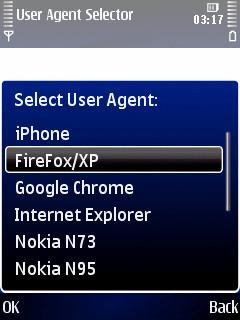
Don't you hate this? You fire up the built-in Symbian web browser of your Nokia, surf to a site, and expect to see the site, the whole site, and nothing but the site... but instead you get a watered down mobile version, because the server on the other end found out you're surfing on your phone because of the user agent string that your browser sends out.
iPhonesque improved things a little by fooling web sites into thinking you were surfing on an iPhone, so they gave you their iPhone browser version. This version often comes with more features than what Symbian users get.
The iPhonesque mod made things even better: its User Agent selector lets you choose how your Symbian browser should identify itself to the web site you want to see. Nokia browser, iPhone browser, Firefox, Internet Explorer, Blackberry, Google Chrome, Windows CE, and more. With the iPhonesque mod you'll get exactly the web site version of your choice.
The iPhonesque mod is available from the Symbian Freak forum for quite a while. Unfortunately it's in the modding section of the forum, which is only accessible for members and not indexed by any search engine. And if you find it you're sent to RapidShare with its forced waiting times... For most people it was hard to find this useful web browser spoofing tool, so it didn't get the exposure it deserves.
But now you can download without logging in or signing up. Just click the link below, download the program, install it, and go. The browser user agent selector is written in Python, so you'll need a copy of that on your phone. But with so many useful Python programs out on the web you had Python on your phone anyway, right?
• the iPhonesque mod
• iPhonesque mod on Symbian Freak (members only)
• Python
Saturday, 22 November 2008
Surf, mail, chat, VoIP, video calls: Skyfire, flurry, eBuddy, and OctroTalk

Skyfire now really for everyone
The new beta test version of Symbian web browser Skyfire is now officially available for everybody. Skyfire loads your pages through its own proxy server. Skyfire supports Flash, Ajax, QuickTime, video, audio, and other features of the "full" web. You can choose between the full web page and (if available) the mobile version.
New in version 0.85 beta:
- No more registration needed. Just download, install, and use.
- Single field to enter URLs or search Google.
- Automatic reconnection if your wireless connection is dropped.
- Easier to download images and other files.
- Less battery drain.
- More phone models supported.
- Bug fixes (but there are still plenty of bugs left).
- And more.
Loading the program and rendering pages is quite slow. Skyfire doesn't have a landscape view option, but you can rotate your screen with rotateMe or LandscapePro.
• Skyfire (on the fly install)
• Skyfire 0.85 on Mobile Castle (downloadable installer)
• A few music videos that play well with Skyfire
Update: Skyfire pulled the plug on its Symbian version. All versions Skyfire for Symbian no longer work.
flurrymail plus
Flurry does POP and IMAP, Hotmail, GMail, Yahoo and more. It doubles as a feed reader, so you can read the feed of this blog with it ;)
Unfortunately it is a mobile Java application, so it takes some time to load. It also shows an advertisement when you start the program.
Flurry tries to persuade you to do an on the fly install from a personalised link, but you can download the .jad file, open it in a program like Notepad to locate the URL of the corresponding .jar file, and download them to your computer to edit the .jar and back it up.
• flurrymail
New eBuddy version is faster, more stable, and easier to navigate
eBuddy is a mobile Java instant messenger that outperforms many Symbian IM programs. The new version is faster, more stable, and its user interface is easier to navigate than before.
There's also a mobile web version of eBuddy that works in your mobile web browser: no need to download or install anything. It also works on your computer. Very useful if you're sitting at a computer that won't let you install things, like at work, school, or in a hotel or internet cafe.
eBuddy wants you to install it on the fly from your phone web browser. To download it to your computer for archiving, or to replace files in the .jar installer, go to get.ebuddy.com, select your phone brand and model, download the .jad file, open it in a text editor like Notepad, and use the URL from the .jad file to download the .jar installer to your computer.
• eBuddy
OctroTalk: mobile instant messenger with voice and video
OctroTalk connects to Google Talk and other Jabber networks, and to MSN, AIM, Yahoo, and ICQ. Not just for chat, but also for file transfer, voice, and video. A great way to avoid the ridiculous video calling rates of your mobile operator. You can also use your own SIP service for VoIP calls.
Video chats only work between OctroTalk users. OctroTalk is free while beta testing lasts, but may cost money later.
• OctroTalk
Monday, 10 November 2008
Symbian Browser & hacked Nokia: move your cache to your memory card
The built-in web browser that comes with Symbian S60 is pretty good, but it caches the sites you've visited on your phone's built-in memory, which is nowhere near as big as your memory card.
But if you've set your phone free, you can move the browser cache to your memory card.
1) Give yourself access to your Symbian system folders by switching "caps" off, and launch a file manager like ActiveFile or X-plore.
2) Delete everything from C:\cache except for the vss folder. The vss folder should stay inside C:\cache.
3) Copy C:\cache (including the vss folder) to E so you'll get E:\cache and E:\cache\vss.
4) Set the attributes of the cache and vs folders in E to "hidden" and "system."
5) Copy Z:\private\10202be9\101f8557.txt to your memory card, and then to your computer.
6) Open 101f8557.txt on your computer and rename every instance of c:\cache to e:\cache. In my 101f8557.txt file I had to do this three times.
7) Send the modified 101f8557.txt back to your phone and save it in C:\private\10202be9.
8) Restart your phone.
Now your cache is moved to your memory card. Keep in mind that this means you can only use Symbian's browser if you have a working memory card in your phone.
To move your cache back to C, remove 101f8557.txt from C:\private\10202be9 and delete E:\cache.
• Hack Symbian: The methods, the tools, the tricks
• Symbian tricks
|


