YourTube
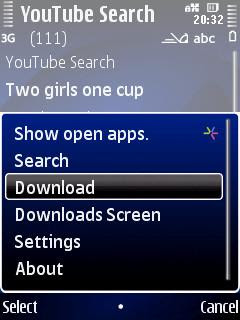
YouTube won't let you download movies to your mobile phone for offline viewing. Enter YourTube, a YouTube downloader that searches videos on YouTube and lets you save them in three video formats (mp4, flv, and 3gp) and different quality settings. YouTube is a mobile Java program, so when you save a movie to your phone it will pop up some security warnings. And sometimes more than some.
YourTube was free, went commercial, but the latest version is free again. Some bugs were fixed too, although that doesn't necessarily mean YourTube will work on your phone. YouTube tries to block video downloader programs like YourTube, and on phones with tight mobile Java security the numerous security popups that need to be clicked away make YourTube unusable.
• YourTube
A better way to download YouTube movies is through your mobile web browser:
• Youtube Mobile Downloader: www.mfws.ro/m.youtube.com UPDATE: this link expired
• Youtube Downloader: www.mfws.ro/youtube.com UPDATE: this link expired
You can download movies from RedTube too.
Sleep Music
Symbian mobile phone timer Sleep Music can switch off your music player, any other program, or even our entire phone. If your phone has an accelerometer, Sleep Music can change the song if you shake you shake your phone. Sleep Music responds to the buttons of some headsets too.
Sleep Music only used to work on Symbian S60 3rd ed. Feature Pack 1 (and pre-FP1 phones), but the latest update works on Feature Pack 2 too. It doesn't work with Symbian S60 5th ed., which means Sleep Music is not compatible with touchscreen Nokias like the N97 and 5800 Xpress Music. Maybe a future update will take care of that?
Sleep Music is not easy to install. It comes as four different .sis files which you have to sign if your phone is not set free, and it needs Python too.
• Sleep Music
Saturday, 5 September 2009
YouTube video downloader YourTube free again, Sleep Music for Feature Pack 2 too


Friday, 28 August 2009
Free YourTube died, UTube still alive and free, Youtube Mobile Downloader beats both

YourTube YouTube video downloader
YouTube for Symbian won't let you download movies for offline viewing, but YourTube does. It lets you search for videos on YouTube, and you can choose between three video formats (mp4, flv, and 3gp) and different quality settings. YouTube is a mobile Java program, so when you save a movie to your phone it will pop up some security warnings.
The old versions of YourTube stopped working. It searches videos and finds them, but when you try to download them you'll get an "invalid server response" error.
The new YourTube update is supposed to fix this. Unfortunately this update also changes YourTube from free to commercial: it limits your search queries to 8 characters, and it wants money if you want to search longer names.
But YourTube is still an open source program, so maybe someone will remove the eight letter limit and rescue the free YourTube?
UPDATE: The free version of YourTube returned.
• YourTube
UTube YouTube video downloader
UTube is another mobile Java YouTube video downloader. You can choose between three video formats (mp4, flv, and 3gp) and different quality settings.
That's the good news.
The bad news is that UTube won't let you search YouTube, so you have to type or copy/paste the full YouTube video URL into the UTube downloader. This means lots of typing or workarounds like saving the page as a temporary bookmark to copy the URL, because web browsers for Symbian don't make it easy to copy URLs and paste 'em into other programs.
The latest UTube update doesn't come with a changelog.
Instead of using UTube you could simply save the UTube downloader site as a bookmark, since the UTube program does nothing but launch your browser anyway. Their site isn't even optimised for mobile phone browsers. It requirs lots of horizontal scrolling, because UTube has huge ad banners that won't fit on a mobile phone screen
• aztube.co.cc, the UTube downloader website
• UTube v2.11 beta at Mobile Castle
Youtube Mobile Downloader
Instead of using YourTube or UTube you can also download YouTube videos to your phone by pointing your mobile web browser to the Youtube Mobile Downloader site.
This site has a new URL.
The Youtube Mobile Downloader site lets you search for YouTube movies (which UTube cant do) without any limits (unlike YourTube). You can download your clips in three video formats at different quality settings, but the default format (.flv) often works best on your phone.
This site also has a big ad banner that causes horizontal scrollbars in your mobile browser, but the search function works and so do the downloads.
The Youtube Mobile Downloader is currently the best way to download videos from YouTube, so make sure to bookmark it in your mobile web browser.
• Youtube Mobile Downloader: www.mfws.ro/m.youtube.com
• Youtube Downloader: www.mfws.ro/youtube.com
You can download movies from RedTube too.
Sunday, 23 August 2009
Watch wider movies with YouTube for Symbian (or MobiTubia, but not Xenozu) and download 'em with YourTube (or UTube)

YouTube for Symbian
YouTube for Symbian is a very simple YouTube video player for mobile phones. You can search and play movies, but you can't log into your YouTube account, which means that YouTube for Symbian won't show any adult movies on your phone. You'll need to visit YouTube's mobile website with your phone's built-in web browser for that.
On first launch YouTube for Symbian makes you choose your location from a short list of countries. It doesn't matter which country you pick, so just choose any country you like if your own country is not on the list.
You can erase your search history and other private data that YouTube collects, but that option is hidden in the help menu.
New in YouTube for Symbian: full screen movies on phones with wide screens like the Nokia 5800 XM, Nokia N97, and Samsung Omnia HD.
YouTube for Symbian comes as an on-the-fly installer, but you can download the program as a .sis file from Mobile Castle. This may help if you can't download the YouTube player because your IP address is not on Google's list of supported countries.
• YouTube mobile site (on the fly installer, download only works with the default web browser of your phone)
• YouTube v2.2.17 on Mobile Castle (downloadable .sis file for everybody, works with all mobile and non-mobile web browsers)
If you don't like YouTube's official player, you can use MobiTubia. Alternative YouTube player Xenozu lets you bookmark videos, but the program is a mess. You have to edit your phone's RealPlayer settings before you can use Xenozu, the terms and conditions screen pops up everytime you start the program, and there's no exit button so you'll have to use the red hangup button.
• MobiTubia
• Xenozu v1.0.5 at Mobile Castle
YourTube YouTube video downloader
YouTube for Symbian won't let you download movies for offline viewing. Enter YouTube video downloader YourTube. It lets you choose between three video formats (mp4, flv, and 3gp), and different quality settings as well. The latest release fixes bugs, YouTube is a mobile Java program, so when you save a movie your phone will pop up a couple of security warnings.
UPDATE: The old versions of YourTube stopped working, and the new version turned into disfunctional crippleware that requires money to unlock.
• YourTube
UTube is another YouTube video downloader, but it's no match for YourTube.
UPDATE: It used to be no match for YourTube, but YourTube went commercial so there seems to be a future for UTube after all.
• UTube
Saturday, 15 August 2009
PowerMP3 adds eye candy, FolderPlay learns to pause, YouTube mobile website supports uploads, UTube downloader back online

PowerMP3
Symbian music player PowerMP3 plays mp3, ogg, aac, and mp4 files, and m3u playlists too. It has a sleeptimer, album art display (including the possibility to download album art), and several ways to keep your ringtones out of your music library. PowerMP3 sorts your music by mp3 tags and folder structure.
For all practical purposes PowerMP3 is still in beta testing, but that doesn't stop its maker from selling registration codes for US$25 apiece. The registration process doesn't always work as it should, and since the latest update doesn't add anything useful you may just as well use (or keep using) the last free beta version instead.
The latest version of PowerMP3 comes with extra skins and themes, a new icon (which doesn't look good on dark backgrounds), and PowerMP3 now speaks brazilian portuguese.
But just because PowerMP3 is able to talk brazilian portuguese doesn't mean it is good at playing playlists with brazilian or portuguese songs, or french music, or any other track that has tildas, accents etc. in its file name. PowerMP3 has a very annoying bug that's been left unfixed for ages: songs with characters like ã, é, ç, etc. in their names don't show up in your imported m3u playlists.
If you install PowerMP3 on top of another version and it doesn't work, uninstall the old version first. If the old version won't go away, switch your phone off and back on.
• PowerMP3 from MobiFactor (commercial version) UPDATE: this link expired
• PowerMP3 v1.17b (no registration needed) at Mobile Castle UPDATE: this link expired
• PowerMP3 1.16 (last free version) at MobiFactor UPDATE: this link expired
• PowerMP3 1.16 (last free version) at Mobile Castle UPDATE: this link expired
• older versions of PowerMP3

FolderPlay
Symbian S60 music player FolderPlay looks like a file manager. If you navigate to a folder with music, it plays all songs in that folder, but subfolders are still a problem. If you play a folder with songs and subfolders, it only plays the tracks in the first subfolder and ignores the rest.
FolderPlay plays MP3, AAC, WAV, FLAC, APE, AC3, OGG, and other files, but not WMA.
The latest FolderPlay update fixes bugs in pause and resume, and an APE playback problem was repaired.
There are other ways to play music organised by folders. Music Launcher is similar to FolderPlay, but MusicLauncher does it better if you stick with MP3. PowerMP3 and TTPod sort your music by tags and by folder structure, and there's a folder structure workaround for the built-in Symbian music player.
• FolderPlay
YouTube
The mobile YouTube website m.youtube.com doesn't look different at first glance, but if you log into your YouTube account you'll find that the new mobile YouTube site now supports video uploading, commenting, and other features that used to be available on the full YouTube site only.
• m.youtube.com
Instead of using your browser, you can also watch YouTube videos with Symbian program YouTube for mobile.
UTube
Want to download and save YouTube videos on your phone?
The official YouTube program and mobile website don't support it, but website and mobile Java application UTube does, and you can choose between three video formats (mp4, flv, and 3gp) and different quality settings.
UTube doesn't do much. It just loads its site your mobile phone web browser, which lets you download YouTube videos to your phone. Videos are downloaded to the standard downloads folder of your phone. UTube doesn't have a YouTube search function, so you have to type or copy/paste the full YouTube video URL into the UTube downloader. This means lots of typing or workarounds like saving the page as a temporary bookmark to copy the URL. Instead of installing UTube you could just as well save the UTube downloader site as a bookmark, since all the program does is launch your browser anyway.
UTube moved to a new web address, and the mobile Java application was updated to work with the new URL.
• aztube.co.cc, the UTube downloader website UPDATE: this link expired
• UTube v2.10 beta at Mobile Castle UPDATE: this link expired
Wednesday, 15 July 2009
UCPlayer for video translated into english

The version of RealPlayer that comes with Nokia phones sucks. The best video player for Symbian is CorePlayer, but you have to pay for it.
Enter UCPlayer. This free video player plays movies in avi, mp4, wmv, flv, mkv, 3gp, and 3gpp format. It doesn't play movies with an .mpg or .asf extension.
UCPlayer works, but it has a very annoying habit: when you start it and play a video stored locally on your memory card or phone memory, it asks for internet access and it doesn't tell you what it wants to do online. There's no way to switch off this behaviour.
But apart from that UCPlayer is a good program, and unlike CorePlayer UCPlayer doesn't cost you a penny.
• UCPlayer v2.1.0.3 (english translation) on Mobile Castle
• check the video tag for other movie players
Tuesday, 7 July 2009
UTube downloader for YouTube videos, FolderPlay updated, hide your ringtones from your music player

UTube
UTube is a mobile Java application which loads www.s60v2.110mb.com/tube.html into your mobile phone web browser. Through this site you can download YouTube videos to your phone.
You can download YouTube videos in FLV, 3GP, and MP4 format, and you can choose different quality settings too. Keep in mind some formats won't play in RealPlayer. Choose 3GP to be sure it plays in RealPlayer (FLV and MP4 may work, but you may also get sound without video in RealPlayer), or use an alternative player such as CorePlayer.
The interface of the UTube downloader needs to be improved. It doesn't have a built-in YouTube search function, and you have to type or copy/paste the full YouTube video URL into the UTube downloader. Since most Symbian browsers don't let you copy the URL of the current page to the clipboard, this means lots of typing or saving the page as a temporary bookmark to copy the URL.
Videos are downloaded to the standard downloads folder of your phone.
Instead of installing the program you could just as well save the UTube downloader site as a bookmark, since all the program does is launch your browser anyway.
The program is still in beta testing, so lets hope the UTube downloader will improve. A few suggestions:
1) let the downloader capture the currently open YouTube URL from your browser so you don't have to type or copy/paste the URL yourself,
2) let the user choose in which folder the video is to be saved,
3) let the user choose a name for the saved video, because "video.mp4" is not very informative.
• UTube v1.00 beta at Mobile Castle UPDATE: this link expired
• UTube downloader page, second UTube downloader page UPDATE: these links expired
FolderPlay
The built-in Symbian music player sorts music by tags, but not by folders. Enter FolderPlay. This program looks like a file manager. If you navigate to a folder with music, it will play all songs in that folder. Unfortunately FolderPlay doesn't handle subfolders well: if you play a folder with songs and more songs in subfolders, it will only play the tracks in the first subfolder and ignore the other songs and folders.
FolderPlay plays MP3, WAV, FLAC, APE, AC3, and other files, but not WMA. The latest FolderPlay update also plays mono FLAC and AC3, and Wave List chunks in WAV files.
There are other ways to play music organised by folders. Music Launcher is similar to FolderPlay, but MusicLauncher does it better. PowerMP3 and TTPod sort your music by tags and by folder structure, and there's a folder structure workaround for the built-in Symbian music player.
• FolderPlay
Hide your ringtones from your music player
Symbian's built-in music player adds all sound files on your phone to its library. This includes your ringtones, and also your voicemails and other recordings if you save them in MP3 or AAC format.
But there's a way to keep unwanted tracks out of your music player library: use a file manager like X-plore, ActiveFile, or Y-Browser to set the attributes of the folder with unwanted tracks to "system" and update your music library. Now your ringtones won't show up in your music player. They will also be hidden from Symbian's File Manager, but they stay visible in the Profiles personalisation screen and the contacts program so you can still change your rintones. If you want to add new ringtones, you'll have to remove the "system" attribute from your ringtones folder first. Don't forget to reapply the "system" attribute, or else your ringtones will reappear in your music player when you update its library.
You can also use PowerMP3 instead of the built-in music player. PowerMP3 makes it easy to exclude ringtones from its music library.
Saturday, 27 June 2009
Clear your mobile browser tracks with Cache Remover, download YouTube and RedTube movies to your phone

Cache Remover
Been surfing sites you shouldn't have been looking at and now you need to destroy the evidence? Cache Remover clears the cache of Symbian's built-in web browser, and it purges the cache of Opera Mobile, Ozone, and UCWeb too.
To make Cache Remover work, you'll need to install it on drive C (your phone's internal memory), not on your memory card. You also need Python and the UltraPyModulePack.
• Cache Remover
Download YouTube and RedTube movies to your phone
You can watch YouTube movies on your phone with Google's YouTube player, MobiTubia, vtap, SkyFire, and Opera Mini can send them to RealPlayer.
But what if you want to download YouTube movies to your phone for offline viewing later?
Just fire up your web browser and go to www.mfws.ro/m.youtube.com. This is a very simple YouTube search site that lets you save YouTube videos on your phone. You can choose between different file formats (mp4, flv, 3gp, and 3gp mobile).
If you can't find your downloaded videos on your phone, then have a look on your memory card in E:\data\download.
There's a similar downloader for adult video site RedTube, but this only downloads movies in .flv format. It comes without a search engine so you'll have to copy/paste the RedTube code into the RedTube downloader site.
• YouTube mobile downloader
• YouTube mobile
• RedTube downloader
• RedTube
UPDATE: The URL for the YouTube mobile downloader changed.
Thursday, 25 June 2009
Free last.fm radio streaming everywhere with Skyfire, Run WMV Player plays Windows Media Video, Audials Mobile rips internet radio streams

last.fm free for all with Skyfire
You can listen to last.fm radio streams with Mobbler and fring, but you'll have to buy a subscription unless you live in the UK, Germany, or the USA.
But there is a way to listen to last.fm radio on your phone without paying. It's available for everyone everywhere. Just load the last.fm site in mobile phone web browser Skyfire. Skyfire is not a very good web browser for Symbian, but unlike other mobile browsers Skyfire can play streaming audio and video files, including last.fm radio stations.
Because Skyfire uses a proxy server located in the USA, last.fm thinks you're in America when you load their site in Skyfire. The result: it doesn't matter which country you're in, with Skyfire everybody can listen to last.fm streams for free!
As long as last.fm can't see the difference between Skyfire users from "free" and "paid" countries there's not much they can do about this loophole.
• Skyfire
Update: Skyfire doesn't work on Symbian anymore.
Run WMV-WMA-ASF Player
Run WMV/WMA/ASF player plays Windows Media files that other free players won't play. The previous english translation of this chinese program didn't play sound on many phones, and it was unsigned so it required a hacked phone or a trip to the Symbian Signed bureaucracy.
But now there's a new english version. It's signed, and the sound issues are gone. There's still some chinese in the user interface, but it's translated well enough to be useful anyway.
Tip 1: The player doesn't listen to the volume rocker. You can adjust the volume with the navigation button: left to turn the sound down, right to pump up the volume.
Tip 2: The program shows up in your menu as "run." You can change the name with Menu Editor.
The built-in media player of new Symbian phones may play Windows Media files, but if you have an older phone then Run WMV-WMA-ASF Player is a useful addition. Even if your phone is not very old installing the program is a good idea. On my Feature Pack 2 Nokia Run WMV-WMA-ASF Player beats RealPlayer 2-1: the built-in Real Player only plays the sound of the WMV files I threw at it, whereas Run WMV-WMA-ASF Player plays the sound and shows the video.
• Run WMV-WMA-ASF Player v1.0 (signed) in english on Mobile Castle UPDATE: this link expired
Audials Mobile
Audials Mobile is an internet radio stream ripper with a search function. If you're looking for the major hits of well known artists Audials usually finds them for you, but if your musical taste is a little off the beaten track Audials Mobile fails.
The makers of Audials Mobile (the same company that made audio ripper TuneBite) asked me to write a review about their program, and they offered me a free license key for my review. I told them I wouldn't do it, because their program is not freeware. Then Audials mailed me again to tell me that "the free version of Audials Mobile allows to download 2 songs per day," so I decided to give their program a try and see if the demo version is usable without buying the full version.
The free version lets you record two tracks a day, but not any two tracks of your choice, because many artists can only be recorded with the premium version.
Small bug in the program: I set the default internet access point to "always ask," but Audials Mobile keeps forgetting my choice and sets my last used access point to default all by itself. Major shortcoming of the program: you can't choose what bitrate you want to record. All tracks I got from Audials were only 128 kbps. The choice of artists, songs, and bitrates with Symbian P2P programs like Symella is much better than what Audials Mobile has to offer.
I didn't take the free license that Audials offered me. Keep in mind that reviews elsewhere may be a little biased because of the free licenses that Audials gives to bloggers.
• Audials Mobile UPDATE: Audials is dead. This link expired.
Thursday, 18 June 2009
Not much new in new YouTube, Evan MP3 Player not suitable for Symbian
YouTube
There's a new version of YouTube for Symbian. At first glance there's nothing new in the latest update of YouTube for Symbian. For example, you still can't log into your YouTube account.
But on closer examination something did change: when you launch YouTube for Symbian for the first time, it asks you to choose your location from eleven countries, up from five in the previous editions.
Not that it really matters, because the program works no matter what location you pick.
Another thing that didn't change: the option to erase your search history and other private data is still hidden in the help menu of the YouTube player. It's about time this function gets a menu entry of its own, but don't count on this happening anytime soon. Google likes cookies, so they won't make it too easy for you to stop them from tracking your online activities.
YouTube for Symbian is distributed by Google as an on-the-fly installer, but if you want to download the program as a .sis file you can do so from Mobile Castle. This may also help if you can't download the YouTube player because your IP address is not on Google's list of supported countries, or if you want to install YouTube on a touchscreen Nokia that runs Symbian S60 5th edition.
• YouTube (official site, on the fly installer, download only works with the default web browser of your phone)
• YouTube v2.2.1 on Mobile Castle (downloadable .sis file for everybody, works with all mobile and non-mobile web browsers) UPDATE: this link expired
• MobiTubia, an alternative YouTube player UPDATE: this link expired
Evan MP3 Player
There are plenty of mp3 player programs for mobile phones. Evan MP3 player works on almost every phone, because it is written in mobile Java.
And mobile Java causes a lot of trouble. Before Evan MP3 Player can play any music it has to find some songs first. To locate music the player has a (not very intuitive) explorer-like menu. You have to guide it to every folder with songs in them, because Evan won't load all tracks on a drive (internal or memory card) in one go. It won't even load songs from subfolders unless you open every subfolder first.
Newer Symbian phones have an overly tight security system for mobile Java programs. As a result, you'll have to give Evan MP3 player permission for every folder it opens and every song it loads. You can't tell your phone something like "yes, you can read my music files, so don't ask me again." The security warnings will drive you crazy, especially if you have a lot of music. When one song ends, your phone will ask for permission to play the next track. And then again and again and again.
Once you've loaded your tracks it's time to play them. But you won't hear any music if you have warning tones switched off. And to switch to a profile with warning tones enabled just because you want to listen to some mp3s...
Most parts of the Evan user interface ignore the central navigation button, and the player doesn'thave an equaliser.
The verdict: forget about using Evan MP3 player on a Symbian phone. Evan may be OK on a Java phone, but if your phone runs Symbian you're better off with PowerMP3 or TTPod. Even Symbian's own music player is better, especially if you make it folder aware with this folder structure workaround.
• Evan MP3 Player at metlock.cz (in czech) UPDATE: this link expired
• Evan MP3 Player at Softpedia (in english) UPDATE: this link expired
• check the music label for PowerMP3, TTPod, and other Symbian music players
Thursday, 11 June 2009
PowerMP3 out of beta but test versions still free, Music Launcher improves, WMV player plays Windows Media Video, Mobbler gets alarm clock
PowerMP3
PowerMP3 plays music in mp3, ogg, aac, and mp4 format, and m3u playlists too. Other features include a sleeptimer, album art display (including the possibility to download album art), and several ways to keep your ringtones out of your music library. PowerMP3 sorts your music by mp3 tags and folder structure.
The latest asks for a registration code that costs US$25. The registration process is still in beta testing (Mobile Castle and Mobicreed have a version that doesn't require registration UPDATE: these links expired), and since the latest update doesn't add anything useful you may just as well use (or keep using) the last free beta version instead.
Just because PowerMP3 went commercial doesn't mean all the bugs are fixed. The most annoying bug that's still there: songs with characters like ã, é, ç, etc. in their names don't show up in your imported m3u playlists.
If you install the latest version of PowerMP3 on top of an older version and it doesn't work, uninstall the older version first. If the old version won't go away just switch your phone off and back on.
• PowerMP3 from MobiFactor (commercial version) UPDATE: this link expired
• PowerMP3 1.16 (last free version) at MobiFactor UPDATE: this link expired
• PowerMP3 1.16 (last free version) at Mobile Castle UPDATE: this link expired
• older versions of PowerMP3
Music Launcher
Music Launcher by Florin Lohan does what Symbian's built-in music player fails to do: it lets you select a folder and then plays all songs in it. Unfortunately Music Launcher is unable organise your music by mp3 tags. PowerMP3 does both, and with a workaround you can make the default Symbian music player do the same.
The latest version has less bugs and displays cover art stored as folder.jpg, but Music Launcher won't display album art stored directly inside your mp3 files.
• Music Launcher
WMV player
Finally there's a free player for WMV (Windows Media Video) movies. The english version of WMV player still shows lots of chinese, and it shows up as "run" in your menu (you can change the name with Menu Editor), but it's usable anyway. So if you have an older phone with a version of RealPlayer that doesn't support .wmv movies, give WMV player a try.
• WMV player (english translation) UPDATE: this link expired
Mobbler
Last.fm player Mobbler is less useful than it used to be, now that last.fm requires payment for music streaming in every country of the world except for three.
(UPDATE: You can listen to last.fm radio for free with Skyfire no matter where you are)
Mobbler has a sleep timer, it can display your last.fm friends, playlist, recently played tracks, recommended artists, track info, and shoutbox. There's gesture support (for phones with an accelerometer), and you can play last.fm radio with scrobbling switched off.
The latest version adds an alarm clock, better search, better album art, better connection options, and better controls for touchscreen phones.
• Mobbler
• last.fm
• fring can play last.fm radio too
• keep your tracks with the Last.FM Downloader for Windows UPDATE: this link expired
Friday, 5 June 2009
YouTube for Symbian fixes bugs, music identifier Shazam iD now also for touchscreen Nokias with Symbian S60 5th ed.
YouTube
YouTube for Symbian plays YouTube video without any extras. It won't let you log into YouTube, so you can't play any adult videos that require logging in.
When you install YouTube it asks you to choose a location from a list of 5 countries. Just pick any country and the program will work. If you can't download the latest YouTube for Symbian version from the official YouTube site, you can get it from sites like Mobile Castle. Tip: you can erase the search history and other private data, but that option is hidden in the help menu.
The latest version fixes bugs but doesn't add any new features.
• m.youtube.com (on the fly installation)
• YouTube 2.0.17 on Mobile Castle (downloadable installer) UPDATE: this link expired
• MobiTubia, an alternative YouTube player UPDATE: this link expired
Shazam iD
Shazam iD works like Sony Ericsson's TrackID. Start the program, point your phone to some source of music, hit "Tag Now," and Shazam will tell you which song you're listening to.
It's been available for Symbian S60 3rd ed. for ages (details here), and now there's a version for Symbian S60 5th ed. too, so you can use it on touchscreen Nokia's like the Nokia 5800 XpressMusic.
• Shazam iD for Symbian S60 5th ed. at MobiCreed UPDATE: this link expired
• Shazam iD for Symbian S60 3rd ed.
• Shazam iD official site (two-week trial, for english users only) UPDATE: this link expired
Wednesday, 1 April 2009
DivX Mobile Player 0.92

DivX Mobile Player for Symbian S60 and UIQ is a very simple program. It plays DivX movies, and nothing else. It's not nearly as good as CorePlayer (which plays almost anything you feed it), but DivX Player is free.
The previous version of the program pops up an "application expired" message, so you'll need to download and install the update if you want to keep watching DivX movies on your phone. Nobody knows what's changed in the latest version. Maybe there's nothing new except for the expiration date?
• DivX Player for mobile phones
Wednesday, 14 January 2009
Radio & TV: Mobbler and vtap

Mobbler
Bug fixes in last.fm radio player Mobbler include fixing of the equaliser, which should mainly benefit users of Nokia E series phones, because they were bitten hard by this bug.
Mobbler plays last.fm radio stations and can scrobble tracks from Symbian's built-in music player to last.fm to help you find similar types of music.
• Mobbler
• last.fm
vtap
Web video player vtap plays movies from YouTube, MySpace, Dailymotion, Veoh, MTV, and many other sites tailored to the display size of your phone.
The Symbian version of vtap only works on a limited number of phone models, but the vtap mobile web player at m.vtap.com works with the built-in Symbian browser of almost any phone.
• vtap UPDATE: This link is dead. And so is Symbian.
• mobile vtap for your Symbian web browser UPDATE: This link is dead. And so is Symbian.
Saturday, 22 November 2008
Surf, mail, chat, VoIP, video calls: Skyfire, flurry, eBuddy, and OctroTalk

Skyfire now really for everyone
The new beta test version of Symbian web browser Skyfire is now officially available for everybody. Skyfire loads your pages through its own proxy server. Skyfire supports Flash, Ajax, QuickTime, video, audio, and other features of the "full" web. You can choose between the full web page and (if available) the mobile version.
New in version 0.85 beta:
- No more registration needed. Just download, install, and use.
- Single field to enter URLs or search Google.
- Automatic reconnection if your wireless connection is dropped.
- Easier to download images and other files.
- Less battery drain.
- More phone models supported.
- Bug fixes (but there are still plenty of bugs left).
- And more.
Loading the program and rendering pages is quite slow. Skyfire doesn't have a landscape view option, but you can rotate your screen with rotateMe or LandscapePro.
• Skyfire (on the fly install)
• Skyfire 0.85 on Mobile Castle (downloadable installer)
• A few music videos that play well with Skyfire
Update: Skyfire pulled the plug on its Symbian version. All versions Skyfire for Symbian no longer work.
flurrymail plus
Flurry does POP and IMAP, Hotmail, GMail, Yahoo and more. It doubles as a feed reader, so you can read the feed of this blog with it ;)
Unfortunately it is a mobile Java application, so it takes some time to load. It also shows an advertisement when you start the program.
Flurry tries to persuade you to do an on the fly install from a personalised link, but you can download the .jad file, open it in a program like Notepad to locate the URL of the corresponding .jar file, and download them to your computer to edit the .jar and back it up.
• flurrymail
New eBuddy version is faster, more stable, and easier to navigate
eBuddy is a mobile Java instant messenger that outperforms many Symbian IM programs. The new version is faster, more stable, and its user interface is easier to navigate than before.
There's also a mobile web version of eBuddy that works in your mobile web browser: no need to download or install anything. It also works on your computer. Very useful if you're sitting at a computer that won't let you install things, like at work, school, or in a hotel or internet cafe.
eBuddy wants you to install it on the fly from your phone web browser. To download it to your computer for archiving, or to replace files in the .jar installer, go to get.ebuddy.com, select your phone brand and model, download the .jad file, open it in a text editor like Notepad, and use the URL from the .jad file to download the .jar installer to your computer.
• eBuddy
OctroTalk: mobile instant messenger with voice and video
OctroTalk connects to Google Talk and other Jabber networks, and to MSN, AIM, Yahoo, and ICQ. Not just for chat, but also for file transfer, voice, and video. A great way to avoid the ridiculous video calling rates of your mobile operator. You can also use your own SIP service for VoIP calls.
Video chats only work between OctroTalk users. OctroTalk is free while beta testing lasts, but may cost money later.
• OctroTalk
Sunday, 16 November 2008
Delete RealPlayer recent clip list, delete Converter exchange rates, save and share mobile Java installer files

If you hack your copy of Symbian to force access to the system folders on your phone you can back up or delete all kinds of things.
To back up (or delete) access points, bluetooth devices, bookmarks, calendar entries, contacts, cookies, SMS and email messages, notes, profiles, and the T9 dictionary, click here.
To delete stuck installer files, dead themes, and "share online" on the active standby screen, go here.
A few more things you can do with a hacked phone and a file manager like ActiveFile or X-plore:
• Clear RealPlayer recent clip list
If you don't want people to find out what videos you've been watching in RealPlayer on your phone, delete C:\Private\10005A3E\mediaplayer.dat.
• Delete stored exchange rates in the Converter
Delete C:\Private\101F4668\UnitConverter.ini.
• Backup and share mobile Java applications
If you install a mobile Java program from a .jad file or on the fly from an SMS or mobile web site, you can copy the .jar file (the file that holds the Java aplication) from C:/private/102033e6/MIDlets (if you've installed the program on your phone memory) or E:/private/102033e6/MIDlets (if you've installed it on your memory card).
More:
• All Symbian hacking methods
• Symbian tricks
|


