Nokia killed Symbian. Many links to Symbian apps on this site have expired. Check out Android Underground.


Showing posts with label email. Show all posts

Sunday, 6 September 2009

Talkonaut fixes bugs but forgets Skype, fring twitters faster, Nokia Messaging plays with Facebook, Fake Messages reads your phone book

Talkonaut Symbian call and chat instant messaging and SIP VoIP fring VoIP Skype instant messaging Twitter Facebook orkut on Nokia Symbian S60

Still no Skype and Facebook in Talkonaut

Instant messenger and VoIP client Talkonaut talks to Jabber (including Google Talk), ICQ, MSN, AIM, and Yahoo. And it lets you call using almost every VoIP service that uses the SIP protocol.

The latest update fixes some very minor bugs, but the main Talkonaut flaw remains: Talkonaut doesn't work with Skype. It doesn't work with Facebook Chat either.

On the bright side, Talkonaut lets you store multiple SIP VoIP settings, which competing programs Nimbuzz and fring still do not.

Talkonaut


Faster Twitter for fring

VoIP client and multi-network instant messenger fring connects you to Skype and standard SIP VoIP, GoogleTalk, MSN (Windows Live), ICQ, Yahoo, AIM, Twitter, and social networking sites like Facebook and orkut. Fring is also a GMail notifier, last.fm radio player, Facebook tool, Twitter application, and it includes Wi-Fi hotspot finder WeFi.

The latest fring version adds support for the Nokia E52 and E72, fixes some connection bugs, and Twitter on fring is faster now.

fring


Push email - Nokia Messaging
Nokia Messaging adds HTML email to touchscreen phones and plays with Facebook

Nokia Messaging is an instant messaging progr...- oh wait, that would be Ovi Contacts. Nokia Email is dead, and its replacement carries a confusing name which hints at instant messaging rather than email.

The latest update adds HTML support for touchscreen Nokias like the N97 and 5800 XpressMusic, but the page layout in HTML emails is still not always what the author intended, and some inline images don't display at all.

Nokia Messaging leaves many processes running when you close the program, and these processes keep your internet connection alive. To make sure you really go offline when you shut down the email client, enter the options menu and go offline before you shut down the email program.

Nokia wants to know your phone number before you can download Nokia Messaging. Why can't they simply put a download link online instead of insisting on an on-the-fly install from an SMS?

The push email service is free for the time being, but it may cost money after the beta trial is over, and payment by SMS is definitely an option. Maybe that's why Nokia wants to know my phone number?

Or maybe they want my number because of this:

According to Nokia Beta Labs, "As a part of Nokia Messaging, we expect operators to offer email, IM and in the future, mobile social networking all for one fixed low price."

Mail, IM, and social networking only? Are the people at Nokia Beta Labs aware of operators offering all of the internet for a fixed price? Whether this fixed price is "low" is a matter of opinion, but "fixed high price" doesn't sound good to the guys and girls at the marketing department.

Nokia's answer to their expectation of what operators may offer for a fixed high/low price is the integration of Facebook in an experimental version of Nokia Messaging. This test version is aimed at the Nokia N97 and Nokia 6700 Classic, and it probably won't work properly on other phones. Other social networks may be included later, and support for other phone models is sure to follow.

Nokia Messaging with social networking installs itself on "C" (your phone's internal memory), and that's where it caches pictures too. If you have a crowded C drive and plenty of space on your memory card, the inability to make the program store its files on "E" becomes annoying real quick. To make things worse, all those Facebook images show up in between your photos in Symbian's gallery too. They've got plenty of things to fix at Nokia Beta Labs.

Nokia Messaging
Nokia Messaging beta test version


Fake Messages SMS creator for Symbian
Fake Messages talks to your phone book

If nobody sends you an SMS, why not send some to yourself? Fake Messages by Jukka Silvennoinen does just that. Receiving a fake SMS at the right time may be your escape ticket out of a boring meeting (sorry boss, gotta go, girlfriend just told me house is on fire).

The user interface of Fake Messages is now available in 17 languages.

The message entry box of Fake Messages doesn't support T9 predictive text, and the program only fakes incoming SMSs. If you want to fake outgoing messages as well, try the fake SMS feature of ActiveFile.

The unsigned version of Fake Messages is free, but you'll have to run it through Symbian Signed before you can install it on your phone, or sign it with your own certificate, or hack your phone to break free from Symbian Signed.

The signed version is comes bundled with adtronic. Adtronic is an intrusive piece of adware that pops up advertisements when you receive calls and messages, so better get the unsigned version. Signing the program or hacking your phone takes a bit of time and effort, but allowing adtronic to pollute your phone is much worse.

Fake Messages


Thursday, 20 August 2009

Updated: Instant messenger Slick, push email program System Seven, and feed reader FlyScreen

Symbian instant messenger Slick, push email program System Seven, RSS feed reader FlyScreen
Slick

Instant messaging program Slick connects to GoogleTalk and other Jabber networks, and to MSN, Yahoo, ICQ, and AIM. Slick does file transfer but not voice chat.

Slick was updated twice lately. The first update fixed a bug that bit Feature Pack 2 phones (hitting the enter key wouldn't sent your messages), but another bug appeared: you couldn't change your Yahoo login details anymore. This was repaired in the second update.

You can use Slick for free while beta testing lasts. But there are so many free instant messengers around that it's hard to believe that Slick will ever cost money.

Slick


System Seven

Mobile push email client System Seven comes with preloaded settings for some popular email services like GMail, which makes it easier to set up your email accounts. System Seven can sync your contacts, calendar, and mail with MS Exchange Server.

The latest update fixes a problem with the * (star) key, which failed to launch the symbol entry menu. And now it can handle multiple accounts with the same username.

System Seven is still in beta testing, and there's plenty left to fix before the program may become usable on Symbian phones. System Seven eats lots of RAM, which slows down everything else on your phone. Your battery also takes a serious hit.

The program installs itself on your phone's built-in memory. If your phone doesn't have loads of built-in memory, forget about System Seven, because it stores your email including attachments on your phone's built-in memory, and you can't tell it to use your memory card instead.

When System Seven runs for the first time, it sends an SMS to +447624802625 without asking you first. It also snatches an active standby shortcut for itself without asking you first, and it does so before you accept the license agreement. Uninstalling System Seven does not necessarily restore the original active standby shortcut.

Before you can download System Seven, you'll need to sign up first. Even if you want to read the FAQ on the System Seven trial site you'll have to register, because the FAQ is part of a closed user forum. You can test System Seven for free while beta testing lasts, but you'll probably need to pay when the program is ready.

System Seven


FlyScreen

FlyScreen is an RSS feed reader with Twitter, Facebook updates, a Google search box, and it shows the weather forecast too. If you leave FlyScreen running in the background you'll always have your updated feeds at your fingertips. If you don't want to keep FlyScreen running in the background you'll have to dig deep into the settings menu to find the exit, or fire up the task manager and use the delete button.

The program does little more than displaying links to websites, and even launches your web browser when you try to edit your collection of feeds. The FlyScreen site made the Symbian browser on my phone display a certificate error.

New in FlyScreen: previews of articles. When you click a title in a feed, FlyScreen shows a snippet of the story. But if you want to read the entire entry FlyScreen still needs to launch your phone's browser to display the content.

Not new in FlyScreen: FlyScreen won't let you merge RSS feeds into a single feed, and it calls all your custom feeds "Custom RSS" in the header without an option to choose a name yourself. The RSS feed box only fills part of your phone screen, with lots of empty space around. And switching tabs often sends you back to your menu or standby screen by accident.

A very annoying "feature" of FlyScreen is that it always remembers the last used access point, even if you don't want it to. The settings menu doesn't have an "always ask me which connection to use" option.

On the bright side, FlyScreen correcty displays the RSS feed of this blog.

FlyScreen wants you to create an account with your phone number as your username, and they want your email address too. If you don't want to get too personal with the makers of FlyScreen you can enter a fake email address and some numbers that look like a phone number.

FlyScreen


Saturday, 30 May 2009

New Morange with old bad habits

Morange mobile phone instant messaging, email, web browser, feed readerJack of all trades program Morange is a mobile Java instant messenger, push email client, web browser, RSS feed and chat room reader, photo uploader, SMS and voice message tool, weather checker, and more.

But there are better instant messaging programs, there are better feed readers, and there are better web browsers. The only thing that may make Morange useful is its push email feature. With so many functions the program resembles the old CompuServe and AOL applications. Its user interface is a horrible mess, and it's slow. Morange is adware that displays ads all over the program. Even worse, its web browser inserts ads into content that Morange didn't make: Morange is a parasite!

The latest Morange update adds picture saving and sending, font size control, the Ocean Age game, and a new logo.

Morange


Saturday, 18 April 2009

Mobiquus push email

Mobiquus push email for Symbian mobile phones
Mobiquus is a new push email service. The email client is a mobile Java program, so it should work on all Symbian phones.

The service works, but the user interface of Mobiquus needs to be improved. Mobiquus doesn't use T9 predictive text, and input of special characters is a mess. For example, the @ symbol is hidden under the #1 key and long-pressing a number doesn't put the number on your screen.

Mobiquus will only push email from a single email account. If you want to use multiple email accounts, you'll need to create multiple Mobiquus accounts, and type in your email address and password everytime you want to switch email account.

Before you can use Mobiquus you'll need to sign up on their website. Mobiquus shares a bad habit with GMail: the small print in their terms of service says they'll finance their service with contextual advertising, i.e. ads based on the content of your emails.

Mobiquus


Friday, 17 April 2009

Mobile RSS Reader for feeds & Redwing for email have something to fix

Mobile RSS Reader for feeds & Redwing for email
Mobile RSS Reader

If you don't like the feed reader of your mobile web browser, mobile Java program Mobile RSS Reader is an alternative. It stores its data on your phone, which keeps costs down for those who pay for data by the megabyte. And it can display all you feeds in one giant "river of feeds," sorted any way you like.

The latest version fixes a long list of bugs, but that doesn't mean you can retire your old feed reader. Mobile RSS Reader does a good job at reading feed headlines and summaries, but if you want to read the full story it opens your phone's default web browser, which does not display all feeds properly. My default Nokia browser choked on my own blog on Google's Feedburner.

Mobile RSS Reader


Redwing

Redwing is a simple, bare bones email application written in mobile Java. It has two major flaws:

1) You need to enter port numbers for all servers. It won't use the default email ports on its own.

2) On my phones Redwing couldn't connect to any of the 3 email servers I tried. Wi-Fi or UMTS made no difference. Competing email programs Nokia Messaging and OnePennyMail managed to connect to all my email accouts at the first try.

Redwing at Softpedia


Friday, 3 April 2009

Email: Nokia Messaging and OnePennyMail updated

Push email - Nokia Messaging & OnePennyMail
Nokia Messaging

In an attempt to make things easy, push email client Nokia Email was renamed to Nokia Messaging (which required Nokia's instant messaging program to live with the name Chat on Ovi, err I mean Contacts on Ovi). But when you install Nokia Messaging, it puts an icon on your phone called (surprise!) "email." Enjoy that simple name while it lasts, because there's a pretty good chance that Nokia's marketing department will find out and rename the email program to something with "Ovi" in it.

The new Nokia Messaging can now read Hotmail all by itself, something that required a trick in older versions of Nokia's email program.

Nokia Messaging can finally display HTML email too, but don't expect it to work well. The page layout is not what the author intended, and some inline images don't display at all.

When I closed Nokia Messaging it left a bunch of processes running that kept my internet connection alive. To make sure you really go offline when you shut down the email client you'll have to enter the options menu and go offline before you shut down the email program.

Nokia asks for your phone number before it lets you download Nokia Messaging. Why can't they simply put a download link online instead of insisting on an on-the-fly install from an SMS?

The push email service is free for the time being, but it may cost money after the beta trial is over, and payment by SMS is definitely an option. Maybe that's why Nokia wants to know my phone number?

Nokia Messaging


OnePennyMail

The poor man's push email solution OnePennyMail is a minimalist mobile Java email client that doesn't have to cost you a penny. It reads mail from POP and IMAP mail accounts, which includes GMail, GMX, Hotmail, and other popular free email services.

OnePennyMail asks you for your phone number before it lets you download and use the program, but in return you get a yourphonenumber@onep.co.uk mailbox which notifies your phone when you get new mail in the form of a missed call. If you put the OnePennyMail phone number in your contacts list and call it something like "you've got mail," OnePennyMail will work like push email without having to sign up for push email. It's almost as good as the real thing.

There were some annoying "features" in the previous version of OnePennyMail, and none of them is fixed in the current version:
- OnePennyMail won't let you organise your mail in folders.
- It won't let you choose between keeping your mail on the server or deleting it.
- OnePennyMail adds an advertisement for itself to your outgoing mails.
- Scrolling up and down an email takes two button presses per line on my Nokia phones. OnePennyMail won't scroll continuously by keeping the navigation button pressed, and there are no shortcuts for "page up" and "page down." Reading a long mail becomes very unpleasant this way.

Even if you don't want to use the creative push email substitute you'll still need to hand over your phone number, because OnePennyMail won't do anything until you enter a code that you can only get by SMS.

OnePennyMail


Thursday, 19 March 2009

Use Hotmail with any email program, email application Seven still won't use your memory card

email, hotmail, system seven, nokia
Hotmail

Hotmail now supports pop3 everywhere, so you can use it with any email program you like instead of struggling with your mobile web browser.

Unfortunately Nokia is not yet aware of this, so if you try to set up Hotmail in the built-in Messaging application of your phone there's a good chance that you'll get sent back to your browser.

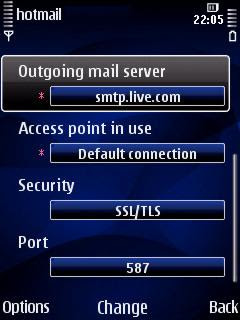
But you can force your phone's Messaging program to let you set up Hotmail manually:

1) Set up a new new mailbox and use the email address yourname@hotmail. Do not use hotmail.com, but leave the .com out.

2) Your phone will complain that it doesn't know the email provider and will start the manual setup. That's exactly what you want it to do.

3) Choose these settings:

Mailbox type: POP3
Incoming mail server: pop3.live.com
Outgoing mail server: smtp.live.com
Access point: whatever you like
Mailbox name: whatever you like

4) Now fire up Email settings from the Options menu, select Connection settings, and enter:

Incoming email
User name: yourname@hotmail.com
Password: your Hotmail password
Security: SSL/TLS
Port: Default (or 995)
APOP secure login: Off

Outgoing email
My email address: your email address (remember to add the .com that you left out in step 1)
User name: yourname@hotmail.com
Password: your Hotmail password
Security: SSL/TLS
Port: 587 (or 25)

Your Hotmail should be live now.


Seven

Seven is a mobile push email client that can sync your contacts, calendar, and mail with MS Exchange Server. It's still in beta testing stage, and has many issues left to be sorted out.

The latest test version adds encryption (to keep people out of your mail if your phone gets lost or stolen), message templates, custom reply-to header and filtering options.

Unfortunately these flaws have not been fixed yet:
- The program, your mail, and all attachments are stored on your phone's built-in memory. Seven won't use your memory card, so forget about receiving mail with big attachments.
- Seven eats lots of RAM. When Seven is running, everything else on your phone is considerably slower. Your battery also takes a serious hit.
- When Seven launches for the first time, it sends an SMS to +447624802625 without asking you first.

You'll need to register with Seven before you can download the program. Even if you want to read the FAQ on the Seven trial site you'll have to sign up first, because the FAQ is part of a closed user forum.

You can test Seven for free while beta testing lasts, but you'll probably have to pay when the program is ready.

Seven


Thursday, 18 December 2008

OnePennyMail and Nokia Messaging

email, Nokia Messaging, OnePennyMail
OnePennyMail is a bare bones mobile Java email client that doesn't have to cost you a penny. It reads mail from POP and IMAP mail accounts, which includes GMail, GMX, and other popular free email services.

In addition, you get a yourphonenumber@onep.co.uk mailbox which notifies your phone when you get new mail in the form of a missed call. If you put the OnePennyMail phone number in your contacts list and call it something like "you've got mail," OnePennyMail will work like push email without having to sign up for push email.

OnePennyMail is a great idea with lots of potential, but it has a couple of annoying "features" that may or may not be fixed in future versions:
- OnePennyMail won't let you organise your mail in folders.
- It won't let you choose between keeping your mail on the server or deleting it.
- OnePennyMail adds an advertisement for itself to your outgoing mails.
- Scrolling up and down an email takes two button presses per line on my Nokia phones. OnePennyMail won't scroll continuously by keeping the navigation button pressed, and there are no shortcuts for "page up" and "page down." Reading a long mail becomes very unpleasant this way.

OnePennyMail won't charge you a penny. Its name comes from a gross overestimate of the cost of data traffic of an email. If you use Wi-Fi or if you have an unlimited data plan with your mobile operator, OnePennyMail is 100% free.

OnePennyMail official site (on the fly install)
OnePennyMail mirrored on Mobile Castle (downloadable installer)


Nokia Messaging is the new name of the old Nokia Email Beta test program and the push email service that comes with it.

The name suggests that Nokia Messaging is not just an email client, but an instant messenger as well. However, it's not. Maybe Nokia's messenger application will be integrated into Nokia Messaging, but Nokia is rather vague on that.

Nokia is vague on pricing too. Nokia Messaging is free for now, but according to Nokia Beta Labs, you are "free to continue using the service until it’s commercially available in your location." Of course you can always switch to programs like OnePennyMail if Nokia Mesaging stops being free.

Compared to Nokia Email, Nokia Messaging has fewer bugs, opens your inbox a bit faster, supports subfolders of IMAP accounts, works with up to ten different email addresses, works on more phone models, and synchronises your sent mail with the sent email folder of your webmail account (but not with your POP3 account).

Nokia Messaging still doesn't support HTML email. And you have to go into the settings menu every time you want to change your access point. But the main reason to stay away from the current version of Nokia Messaging: it won't work on Wi-Fi. So if you don't want to pay a fortune on data charges, only use Nokia Messaging on an unlimited data plan, and forget about Nokia Messaging when roaming.

Nokia Messaging


Saturday, 22 November 2008

Surf, mail, chat, VoIP, video calls: Skyfire, flurry, eBuddy, and OctroTalk

Skyfire Symbian mobile phone web browser
Skyfire now really for everyone

The new beta test version of Symbian web browser Skyfire is now officially available for everybody. Skyfire loads your pages through its own proxy server. Skyfire supports Flash, Ajax, QuickTime, video, audio, and other features of the "full" web. You can choose between the full web page and (if available) the mobile version.

New in version 0.85 beta:
- No more registration needed. Just download, install, and use.
- Single field to enter URLs or search Google.
- Automatic reconnection if your wireless connection is dropped.
- Easier to download images and other files.
- Less battery drain.
- More phone models supported.
- Bug fixes (but there are still plenty of bugs left).
- And more.

Loading the program and rendering pages is quite slow. Skyfire doesn't have a landscape view option, but you can rotate your screen with rotateMe or LandscapePro.

Skyfire (on the fly install)
Skyfire 0.85 on Mobile Castle (downloadable installer)
A few music videos that play well with Skyfire

Update: Skyfire pulled the plug on its Symbian version. All versions Skyfire for Symbian no longer work.


flurrymail plus

Flurry does POP and IMAP, Hotmail, GMail, Yahoo and more. It doubles as a feed reader, so you can read the feed of this blog with it ;)

Unfortunately it is a mobile Java application, so it takes some time to load. It also shows an advertisement when you start the program.

Flurry tries to persuade you to do an on the fly install from a personalised link, but you can download the .jad file, open it in a program like Notepad to locate the URL of the corresponding .jar file, and download them to your computer to edit the .jar and back it up.

flurrymail


New eBuddy version is faster, more stable, and easier to navigate

eBuddy is a mobile Java instant messenger that outperforms many Symbian IM programs. The new version is faster, more stable, and its user interface is easier to navigate than before.

There's also a mobile web version of eBuddy that works in your mobile web browser: no need to download or install anything. It also works on your computer. Very useful if you're sitting at a computer that won't let you install things, like at work, school, or in a hotel or internet cafe.

eBuddy wants you to install it on the fly from your phone web browser. To download it to your computer for archiving, or to replace files in the .jar installer, go to get.ebuddy.com, select your phone brand and model, download the .jad file, open it in a text editor like Notepad, and use the URL from the .jad file to download the .jar installer to your computer.

eBuddy


OctroTalk: mobile instant messenger with voice and video

OctroTalk connects to Google Talk and other Jabber networks, and to MSN, AIM, Yahoo, and ICQ. Not just for chat, but also for file transfer, voice, and video. A great way to avoid the ridiculous video calling rates of your mobile operator. You can also use your own SIP service for VoIP calls.

Video chats only work between OctroTalk users. OctroTalk is free while beta testing lasts, but may cost money later.

OctroTalk

Saturday, 25 October 2008

GMail 2.0: Multiple accounts, offline browsing, cosmetic and speed improvements

GMail mobile email
Reading your mail with Google's mobile email application is faster and easier than using your mobile web browser to get into your GMailbox.

New in version 2.0:
- support for multiple GMail accounts,
- offline browsing: latest mails are stored on your phone, you only need a connection for sending mail and retrieving old messages,
- smoother scrolling,
- other cosmetic improvements.

There's still no native Symbian program, though, so Google's mobile GMail client has all the limitations of a mobile Java application.

GMail:
Google's mobile GMail client
Mobile GMail site

Want to use your GMail account to store files?
GSpaceMobile


Friday, 26 September 2008

Use GMail as mobile online storage with GSpaceMobile, GMail for mobile, or the mobile GMail site

GMail mobile email
GSpaceMobile lets you use the storage space of a GMail account as a network drive on your phone. That's easier than sending an retrieving files using a mobile email client or web browser. Unfortunately, the free version of GSpaceMobile only handles one GMail account with a 1 MB file size limit. That may be enough to make an instant online backup of the pictures you shoot with your phone camera, but if you want more you'll have to pay for the full version of GSpaceMobile, or...

...or use GMail's own mobile email client, which is the fastest way to get into your inbox from your phone. Comes with synchronisation and search function.

Of course you can always get into GMail with your mobile web browser. The mobile version at m.gmail.com loads a lot faster than the standard GMail site.

GSpaceMobile
Google's mobile GMail client
Mobile GMail site


Sunday, 27 July 2008

Backup your phone: access points, bluetooth devices, bookmarks, calendar, cookies, messages, notes, profiles, and T9 dictionary

Symbian Calendar
New phone? Hard reset? Firmware upgrade? Or you just want to be prepared for just in case? Of course you can backup all kinds of things on your phone with PC Suite or the backup feature of the data manager on your phone, but that takes forever, requires a computer (PC Suite), and won't let you choose what to backup (data manager).

But if you hack your phone to set it free and get full access to all system folders, you can backup exactly what you want.

All you need is a hacked phone, and a decent file manager like ActiveFile, X-Plore, SExplorer, FExplorer, or Y-Browser.

Access Points:
Your access points are stored in C:\Private\10202be9\persists\cccccc00.cre. Just make a copy of cccccc00.cre, and restore it to your phone (or send it to another phone), restart your phone, and you have your access point settings back just the way they were when you made the backup.

Bluetooth:
Your bluetooth name is in C:\Private\10202be9\persists\10204dac.cre, your paired devices are in C:\Private\100012a5\DBS_100069CC_btregistry

Bookmarks:
The bookmarks of Symbian's built-in web browser are stored in C:\Private\100012a5\DBS_101FD685_BrowserBookmarks.db.

Calendar:
Calendar entries are stored in C:\Private\10003a5b\Calendar. For more info on backing up and restoring your calendar click here.
On some phones the folder name is 1000395b.

Contacts:
Your contacts database is in C:\Private\100012a5\DBS_100065FF_Contacts.cdb.
On some phones the folder name is 10001295.

Cookies:
The cookies of Symbian's built-in web browser are in C:\Private\101f8530\cookies.dat. Restart your phone after restoring or transfering the cookies file. If you've told your browser to delete your cookies, there is no cookies.dat file in C:\Private\101f8530.

Messages:
Your SMSs and mails from Symbian's built-in messaging application are stored in C:\Private\1000484b. If you've told your phone to store messages on your memory card, they are in E:\Private\1000484b. Copy the entire folder, and restore when needed. For more info on backing up messages click here.

Notes:
The notes you write in Symbian's Notes application are stored in C:\Private\100012a5\DBS_101F8878_Notepad.dat.
If you can't delete or replace the file, it's because Symbian is using it. But there's a workaround for this problem: go to settings, data manager, memory, and select "back up phone memory" from the options menu. While your phone is making the backup, you can delete or replace the DBS_101F8878_Notepad.dat file.

Profiles:
Your profiles are stored in C:\Private\10202be9\persists\101f8798.cre. If you restore the backup, restart your phone.

T9 dictionary:
Your frequently used words in SMS and email are stored in C:\Predic\101F8615_F.dat. You don't even need to hack your phone to get into this folder. For more info click here.


This post was stolen without referring to the source by the copycats of Mobile PC, Mobile Tricks on G-Blogs, and Mobile Geeks.