
X-plore is the best file manager for Symbian if you want to manage files. But file manager ActiveFile has a few extra features beyond file managing that make it a great program.
ActiveFile is also a task manager. And it can reboot your phone, make screenshots, back up your SMSs, and it can make fake messages too.
The file manager gets the job done. The two pane layout makes it easy to move files between folders. Unfortunately ActiveFile lacks the "tree view" option of X-plore. The # key selects and deselects files and folders, unlike previous versions of the program. Unfortunately the selection marker is very hard to see on white file icons.
The screenshot tool of ActiveFile usually needs to be triggered with the C (delete) key, unless you have a very old phone that still has a pencil key. The camera key can make screenshots in theory, but on my phones it keeps launching the camera instead of making screenshots.
The option "turn light on" is probably meant to light the led so you can use your phone as a flashlight, but this didn't work on any of my phones. If you want to use your phone as a torch, use BrightLight.
SMS backup and restore is the best feature of ActiveFile. You can back up and restore every message folder, including your custom message folders. Better yet, ActiveFile can restore your messages in a non-destructive way: if you restore a backup, new messages that arrived after you made the backup stay on your phone. If you send a backup from one phone to another, the two SMS folders are merged perfectly. Not even Nokia's own Ovi Suite will do that for you.
You can choose whether the SMS backup file should be stored on your phone's own memory or on your memory card, but you can't select the folder in which ActiveFile should store the backup. ActiveFile doesn't even tell you the location of the backup file, and the SMS backup screen has no options for copying backups to your computer, storing them online, or sending them to other Symbian phones to merge different messaging folders. Of course there's a workaround to do all that: just navigate to the backup files in any file browser to copy, send, move, or delete 'em. ActiveFile stores your backups in C:\Data\Others or E:\Others, depending on whether you choose internal memory or memory card as backup location.
ActiveFile may crash with an out of memory error when you restore backups with a lot (many hundreds) of messages, so don't rely on ActiveFile as your only SMS backup method.
ActiveFile can create fake SMSs. Unlike other fake SMS creators like Free-iSMS and Fake Messages (which can only fake incoming messages), ActiveFile can fill your inbox and sent folder with fake incoming and outgoing SMSs. Old versions of ActiveFile would get the date and time of your fake messages wrong, but the latest version gets it right.
The latest version (v1.44.5) fixes some other bugs (details here UPDATE: This link is dead. And so is Symbian.) too. It works well on my phones except for one: on my old Symbian S60v3 feature pack 2 phone the program shuts down whenever I try to open the options menu. On this phone I'll stick with version 1.44.0, which fortunately is still available on the ActiveFile website.
• ActiveFile from Alie Tan UPDATE: This link is dead. And so is Symbian.
Monday, 24 January 2011
ActiveFile fixes old bugs but comes with a new problem


Wednesday, 12 January 2011
Nimbuzz uses less data and can make you invisible, but watch your SIP and connection settings
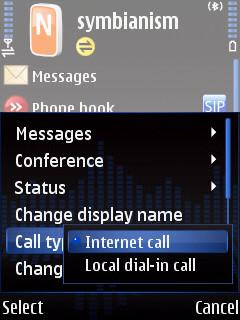
VoIP, chat, and twitter program Nimbuzz talks to SIP, GoogleTalk, Jabber, MSN (Windows Live), Yahoo, AIM, ICQ, Gadu-Gadu, Facebook, Twitter, MySpace, orkut, and Hyves.
The latest update promises to use 70% less data, which sounds good if you use Nimbuzz over 3G. Keep in mind that 70% means "up to 70%." Your mileage may vary and will probably be less. You can now also log into your chat networks in invisible mode, and block chat attempts from anyone who's not on your contact list.
The previous update reset my notification sounds and vibration alerts to default, but this version left them the way they were.
So far, so good. But...
...unfortunately the latest edition still behaves badly. I installed version 3.01 on top of the previous version, but my preferred VoIP provider was reset from SIP to NimbuzzOut without any warning. Maybe Nimbuzz doesn't like competition? So don't forget to go through the settings again when you install a new copy of Nimbuzz on top of the old version.
Another annoyance: whenever I connect over 3G, Nimbuzz stores that connection as "preferred carrier" without asking me, and there's no way to switch this unwanted behaviour off. Worse yet, at next launch Nimbuzz automatically tries to use this connection, and hitting "cancel" shuts down the application instead of asking you how you want to connect. Nimbuzz should definitely fix this in the next update.
• Nimbuzz
• fring (the main competitor of Nimbuzz)
Monday, 10 January 2011
Skyfire for Symbian is really dead

Skyfire was never a good mobile browser. It was slow, ate lots of data, only worked in North America and Western Europe, and it sucked your battery dry real quick. But it did let you watch Flash and QuickTime movies where other browsers failed, and because of its american proxy server Skyfire allowed those outside Germany, England, and the USA to listen to last.fm without having to buy a subscription.
But not anymore. Skyfire for Symbian was pulled from Skyfire's own website and the Ovi store a while ago, and all the copies on forums and other sites stopped working. No version of Skyfire connects on my Nokias. Skyfire for Symbian is really totally dead now.
Maybe I'll meet Skyfire again on Android. Sure, Android can do Flash by itself, but bypassing the geographical restrictions of last.fm through Skyfire's proxy server is a good thing too.
Friday, 26 November 2010
Web browsers: Opera Mobile fast, Skyfire dead, Bolt new
Opera Mobile

The big brother of Opera Mini is updated: version 10.1 is no longer in beta testing. Unlike Opera Mini, Opera Mobile doesn't use a proxy server so there's nothing in between you and the web. Version 10.1 scrolls smoother and runs javascript faster.
Opera Mobile has a turbo mode which makes it behave like Opera Mini. The main advantage of turbo mode is that it saves a lot of data traffic, which could make a big difference on your phone bill if you're roaming abroad and pay by the megabyte. It looks like Opera Mini in just about everything else too. Same user interface with tabbed browsing, Opera Link to synchronise your bookmarks and speed dials with other Opera browsers (like Opera Mini) on all your phones, and the same annoying "are you sure" confirmation screen when you want to close the program.
• Opera Mobile
Skyfire
Skyfire is not a good mobile browser (slow, eats lots of data, only works in North America and Western Europe), but it does let you watch Flash and QuickTime movies, and because of its american proxy server it allowed those outside Germany, England, and the USA to listen to last.fm without having to buy a subscription.
But hurry, because Skyfire is going to ditch Symbian. Skyfire's site only lets you download the iPhone and Android versions, and they announced that the proxy-based Symbian version 1.0 will stop working at the end of the year. The latest Symbian version of Skyfire is 1.5, but all the signs indicate that this version will die together with version 1.0.
• Skyfire
Skyfire for Symbian is no longer available from Skyfire's own website, and they've pulled out of the Ovi store too. You can still get Skyfire 1.5 from Mobile Castle:
• Skyfire 1.5 at Mobile Castle (you'll need to create a free account, or use BugMeNot) UPDATE: Mobile Castle is dead. And so is Symbian.
Update: Skyfire is really dead now. No version of Skyfire connects on my Nokia. They promised to kill it and they killed it.
Bolt

Now that Skyfire for Symbian is about to die, it might be a good idea to give Bolt a shot.
Symbian web browser Bolt does tabbed browsing, has a good user interface, and it does a good job at conserving page layout (except for sites with frames). Bolt plays YouTube and other Flash video, but Skyfire does it better.
There's no predictive text input, so entering URLs can be a bit unpleasant.
Bolt is made in mobile Java. The official site only gives you a .jad file, and wants you to download the corresponding .jar file from your phone for an on-the-fly install. Of course you can also open the .jad file in a text editor to look up the URL for the .jar file if you want to look inside the file before installing it on your phone.
If Bolt doesn't play sound on your phone, switch to a profile with warning tones on and try again. Yep, that sucks, but it's a disadvantage common to mobile Java programs.
• Bolt UPDATE: This link is dead. And so is Symbian.
• Bolt at GetJar UPDATE: This link is dead. And so is Symbian.
|


